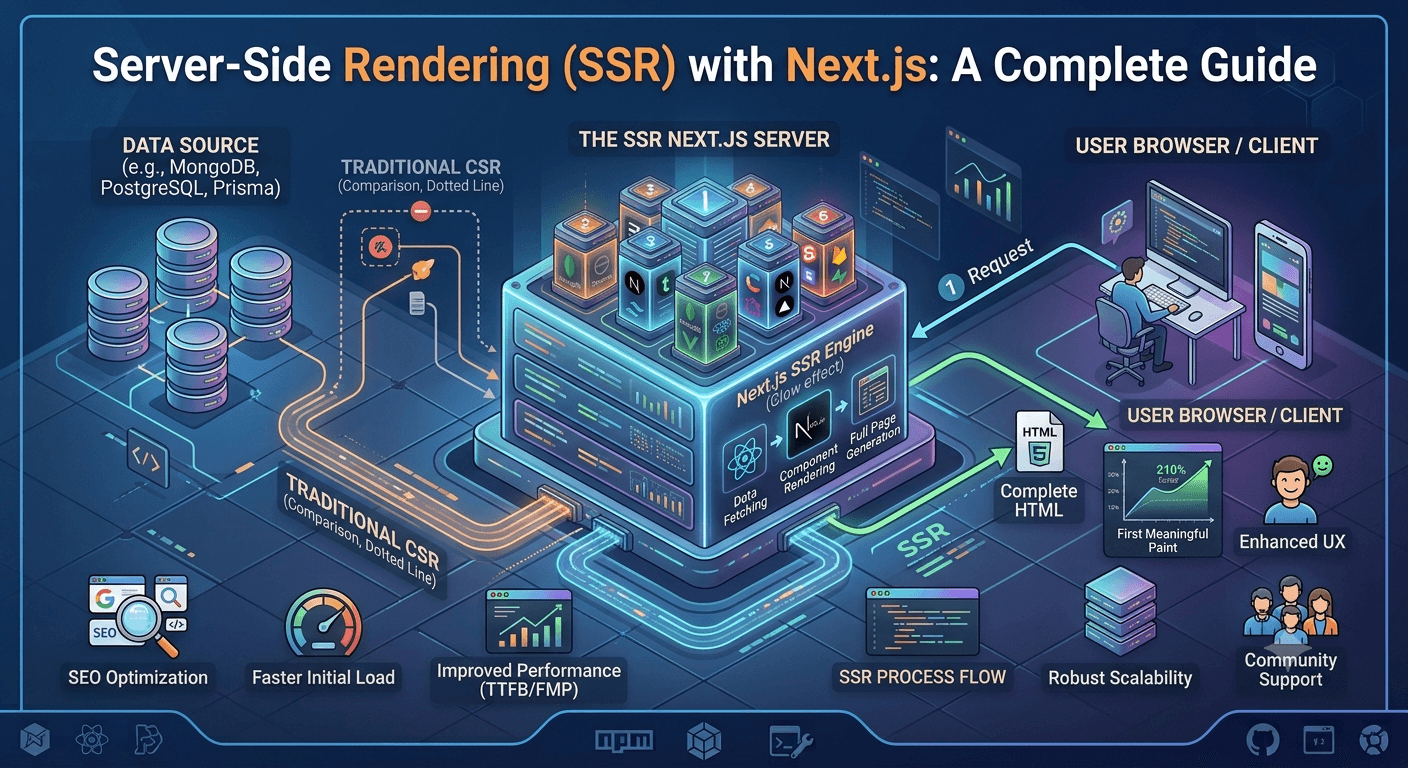
Server-side rendering (SSR) is one of the core ideas behind why Next.js has become so popular for building modern web applications. Instead of sending a mostly-empty HTML page to the browser and letting JavaScript build the interface afterward, SSR generates the fully-rendered HTML on the server first, then sends that complete page to the user.
Here's why that distinction matters:
Speed: Because the browser receives a fully-rendered page rather than a blank shell, users see meaningful content sooner instead of waiting for JavaScript to load and run before anything appears.
SEO: Search engine crawlers can read fully-formed HTML immediately, without needing to execute JavaScript to "discover" the page's content — making SSR pages easier to index accurately.
Dynamic Data: SSR allows the server to fetch fresh, real-time data for every single request, so users always see up-to-date information rather than a stale, pre-built version of the page.
Why SSR Exists: The Problem It Solves
To understand SSR, it helps to understand what came before it. Traditional client-side rendering (CSR) — the approach used by many single-page applications — sends the browser a minimal HTML file plus a JavaScript bundle. The browser then has to download, parse, and execute that JavaScript before the page becomes visible or usable. This creates two recurring problems:
Slower perceived performance, especially on slower networks or devices, since users often stare at a blank screen or loading spinner while JavaScript takes over.
Weaker SEO, since not all search engine crawlers reliably execute JavaScript, meaning content that's rendered client-side can be missed or indexed incorrectly.
SSR addresses both issues by shifting the rendering work to the server, which has more consistent processing power than a user's device and doesn't depend on the user's network conditions to "build" the page.
How Next.js Implements SSR
Next.js handles SSR through a structured, file-based architecture. Rather than manually wiring up a server-rendering pipeline, developers work within conventions that Next.js interprets automatically:
The root layout defines the persistent structure shared across pages (things like the HTML shell and body).
Individual pages represent specific routes, and are server-rendered by default.
A dedicated data-fetching mechanism runs on the server for each incoming request, retrieves whatever data the page needs, and passes it directly into the rendered HTML before it ever reaches the browser.
This means that by the time a user's browser receives the page, all the necessary data has already been fetched and woven into the markup — there's no separate "loading" step required just to display the initial content.
Fetching Fresh Data on Every Request
One of the defining characteristics of SSR in Next.js is that data-fetching happens per request, not once at build time. This is what separates SSR from static site generation (SSG), Next.js's other major rendering strategy.
With SSG, pages are built once, in advance, and served as static files — great for content that rarely changes, like a blog post or marketing page.
With SSR, the server re-runs the data-fetching logic on every single request — ideal for content that changes frequently or is personalized per user, like a live product catalog, a user dashboard, or search results.
This trade-off matters: SSR gives you freshness at the cost of a bit more server work per request, while SSG gives you speed and low server load at the cost of that data going stale between builds.
Dynamic Routes: Rendering Based on the URL
Real applications rarely have a fixed, finite set of pages — think of a product page for every item in a catalog, or a profile page for every user. Next.js handles this through dynamic routing, where a single template file can represent an entire category of pages, with the specific content determined by a variable portion of the URL (like a product ID or username).
When a request comes in for one of these dynamic routes, the server reads the relevant identifier from the URL, uses it to fetch the matching data, and renders that specific version of the page — all before sending anything to the browser. If no matching data exists, the server can also return a proper "not found" response instead of rendering a broken or empty page.
Performance Considerations in SSR
Because SSR does real work on every request, performance tuning becomes an important part of building an SSR application well. Three concepts matter most:
Caching
Even though SSR generates pages dynamically, that doesn't mean every request needs to hit the origin server from scratch. Response caching allows a rendered page to be temporarily stored and reused for a short window — often just seconds — dramatically reducing server load for high-traffic pages while still keeping content nearly real-time. A common pattern is to serve a cached version instantly while quietly re-generating a fresh copy in the background for the next visitor.
Code Splitting
Not every part of a page needs to load immediately. Code splitting is the practice of breaking a JavaScript bundle into smaller pieces and loading each piece only when it's actually needed — for example, delaying the loading of a heavy chart or map component until the user scrolls to it, rather than bundling it into the initial page load. This keeps the first paint of the page fast, even in applications with a lot of interactive functionality.
Selective Hydration
SSR sends fully-rendered HTML to the browser, but that HTML is initially static — it needs to be "hydrated" with JavaScript before it becomes interactive (before buttons work, forms respond, etc.). Selective hydration means only hydrating the specific parts of the page that actually need interactivity, rather than hydrating the entire page at once. This reduces the amount of JavaScript the browser has to process up front, improving how quickly the page feels usable.
Deployment Considerations
Because SSR pages are generated by a server at request time (rather than served as pre-built static files), deployment requires an environment capable of running that server-side logic continuously — not just hosting static assets.
Two broad approaches are common:
Managed platforms (like Vercel, the company behind Next.js) handle server infrastructure, scaling, and SSL automatically, letting teams deploy without managing servers directly. This is usually the simpler path, especially for teams that want to move fast.
Self-managed cloud infrastructure (like AWS) offers more granular control over server configuration, scaling rules, and cost management, at the expense of additional setup and ongoing maintenance responsibility.
Whichever path you choose, SSR applications benefit from monitoring and auto-scaling, since server load is directly tied to incoming traffic in a way that static sites don't experience — a traffic spike means more rendering work, not just more file downloads.
Wrap-Up
Server-side rendering shifts the responsibility of building a page from the user's browser to the server, trading a bit of server-side work for faster perceived load times, stronger SEO, and reliably fresh data. Next.js formalizes this pattern through file-based routing, per-request data fetching, and built-in performance tools like caching, code splitting, and selective hydration — making a traditionally complex architecture much more approachable.
Understanding why SSR works this way — not just how to configure it — makes it much easier to decide when SSR is the right choice versus static generation or client-side rendering for a given page.
Learning Resources
Official Documentation